
How do you clean data in many Excel files at once on a Mac?
By Kayabyte · Last updated 31 October 2026
To clean an Excel file on a Mac you trim spaces with TRIM, convert text to numbers with Text to Columns, unmerge and fill down with Go To Special, and delete blank rows the same way. Each step is manual, per file and per sheet. For many files, Gridhand’s Clean tool applies the steps you tick to every file at once, with a preview first.
The manual recipes in Excel for Mac
Trim spaces. In a helper column enter =TRIM(A2); for non-breaking spaces use =TRIM(SUBSTITUTE(A2,CHAR(160)," ")). Copy the column and Paste Special, Values over the original, then delete the helper.
Text to numbers. Select the column and choose Data, Text to Columns, Finish. Or click the green warning triangle and choose Convert to Number, or multiply by 1 with Paste Special, Multiply. Careful: this strips leading zeros from codes such as 00123.
Dates stored as text. Data, Text to Columns, step 3, choose Date and the order (MDY, DMY or YMD). A column that mixes orders cannot be fixed by one setting.
Unmerge and fill down. Select the range, Home, Merge & Center menu, Unmerge Cells. Then Edit, Go To, Special, Blanks, type = and the Up arrow, and press Ctrl-Return to fill every blank from the cell above. Paste Special, Values afterwards.
Remove empty rows. Select the column, Go To Special, Blanks, then Home, Delete, Delete Sheet Rows. Careful: this removes any row where that column is blank, even if other columns have data.
Remove duplicates. Data, Remove Duplicates on the columns that define a duplicate.
Why it does not scale
Every file needs the same dozen clicks, and a mistake (a deleted row that was not empty, a lost leading zero) is easy to make and hard to see. A macro can automate the steps, but someone has to write, test and maintain it for every layout.
With Gridhand
Gridhand Clean runs the steps you tick over every file you add, and shows examples and counts in the preview before anything is written:
- Trim the ends of text and collapse repeated and non-breaking spaces.
- Turn text that looks like a number into a number, keeping codes with leading zeros and codes of 12 or more digits as text.
- Turn text dates into real dates with one format. If day-first or month-first is unclear in a column, it asks instead of guessing.
- Unmerge cells and fill the value down.
- Remove duplicates by the columns you choose (the first stays).
- Remove empty rows and columns, adjusting formulas, charts and named ranges that pointed past them.
Each file stays the same type, macros included. In a workbook with pivot tables, Clean removes no rows or columns, because a removed row would leave the pivot pointing at the wrong cells; the result says so. Originals are never modified.
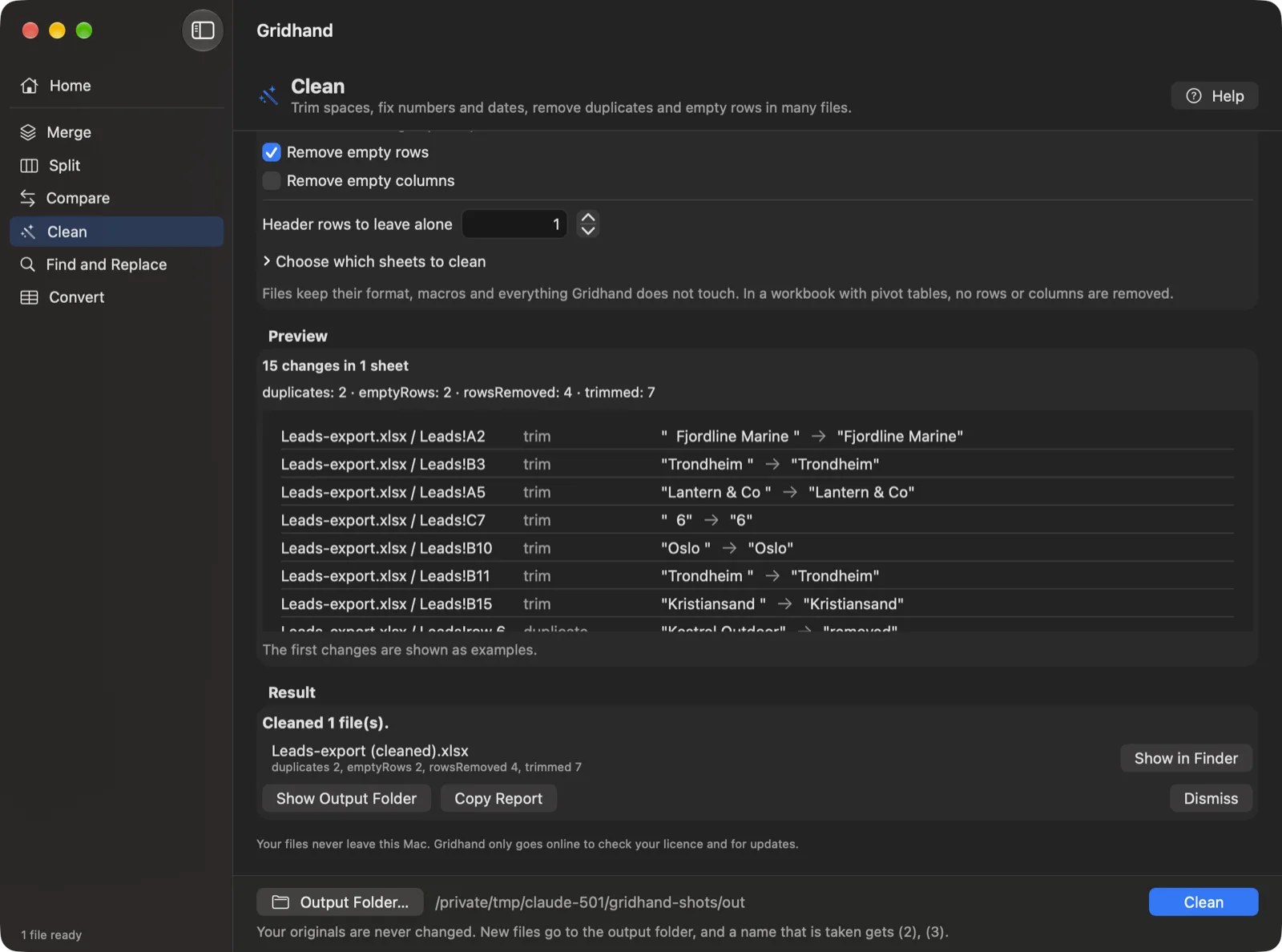
Steps with Gridhand
- Drop the workbooks, or a folder, into Gridhand and choose Clean.
- Tick the steps you want and set the decimal mark, date format and key columns if asked.
- Read the preview, choose an output folder and press Run.
- Check the report for notes marked “Check these”.
Free for up to 3 files per run; Gridhand Pro is USD 49 once. Download Gridhand
Questions
Will it turn my ZIP codes and IDs into numbers? No. Codes with leading zeros stay text, and so do codes of 12 or more digits.
What about dates like 03/04/2026? Gridhand detects day-first or month-first per column, and asks when a column is ambiguous.
Does it change the original files? No. Cleaned copies are written into the output folder you choose.
Related guides
Microsoft and Excel are trademarks of the Microsoft group of companies. Gridhand is made by Kayabyte and is not affiliated with or endorsed by Microsoft.
More guides
- Is there an ASAP Utilities for Mac, and what can you use instead?
- How do you batch convert CSV files to XLSX on a Mac?
- How do you combine multiple CSV files into one Excel workbook on a Mac?
- How do you combine multiple Excel files into one sheet on a Mac?
- How do you compare two Excel files on a Mac?
- How do you convert XLSX to CSV on a Mac, for every sheet and many files?
- Gridhand vs XLclick vs XLWizard: which Excel tool for Mac?
- Is there a Kutools for Mac, and what are the alternatives for Mac?
- How do you merge Excel files on a Mac?
- Can you use Power Query on a Mac to merge Excel files?
- How do you split Excel data into one file per customer, region or month on a Mac?
- How do you split an Excel workbook into one file per sheet, or every N rows, on a Mac?