
Gridhand: Batch Toolbox for Excel Files on Mac
Gridhand covers the batch file jobs people use Excel add-ins for, as a native Mac app. It merges, splits, compares, cleans, finds and replaces, and converts many files at once, carries over cell formatting where the operation allows it (the report lists what it cannot), never changes your originals, and shows a preview before it writes anything. Your files are processed on your Mac and never uploaded.
Download free · Pricing · macOS 14 or later
Free to try on up to 3 files per run. Gridhand Pro is USD 49 once, for 2 Macs.
Launch offer: 30% off Gridhand Pro until 30 November 2026 with code GRIDHAND30, applied at checkout.

Six tools
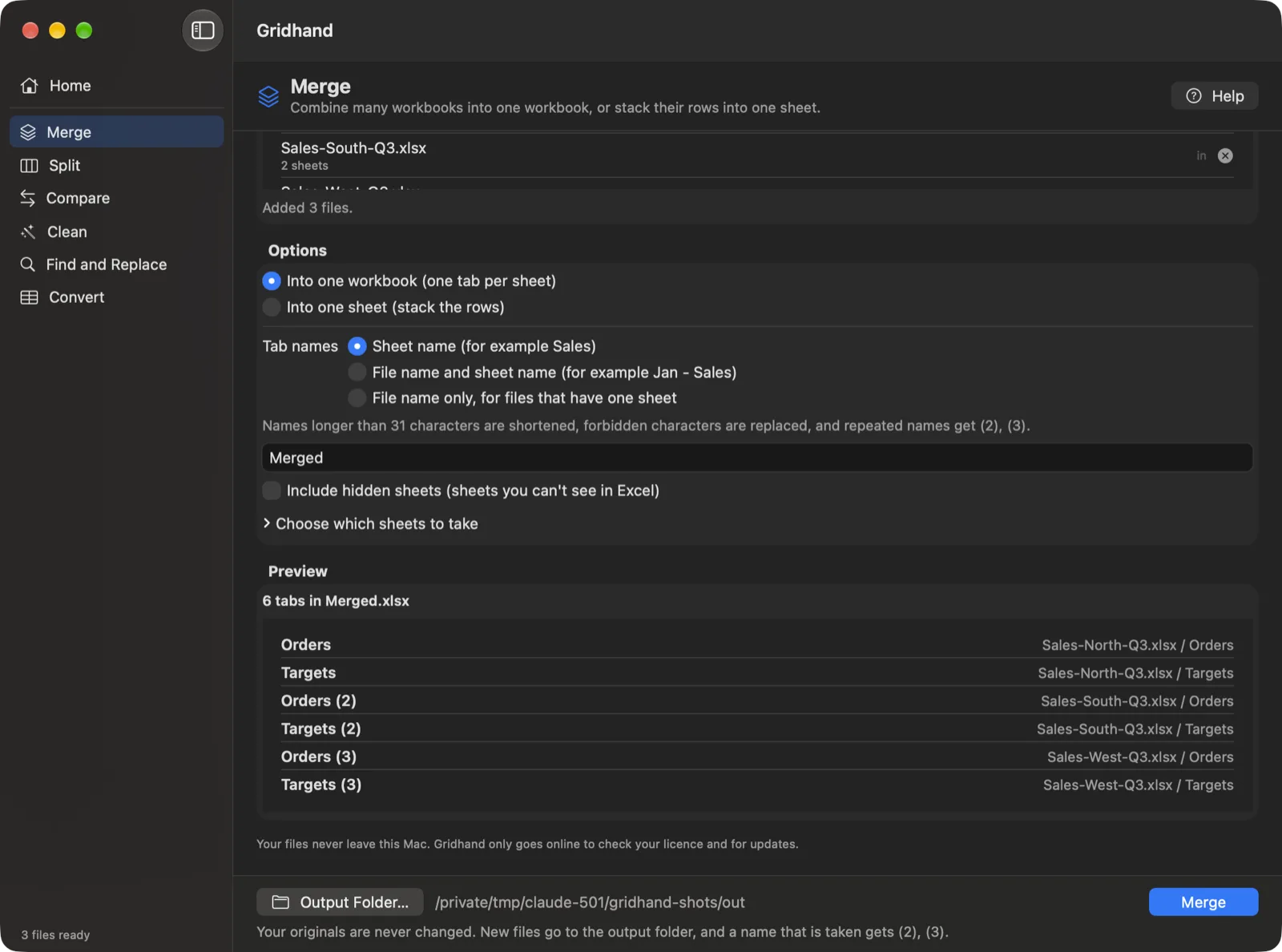
Merge. Combine many workbooks into one workbook, with every sheet kept as a tab, or stack the rows of many sheets into one sheet under a single header. Columns are matched by header text, and you can add the source file and sheet as columns. Guides: merge Excel files on a Mac, combine files into one sheet, combine CSV files into one workbook.
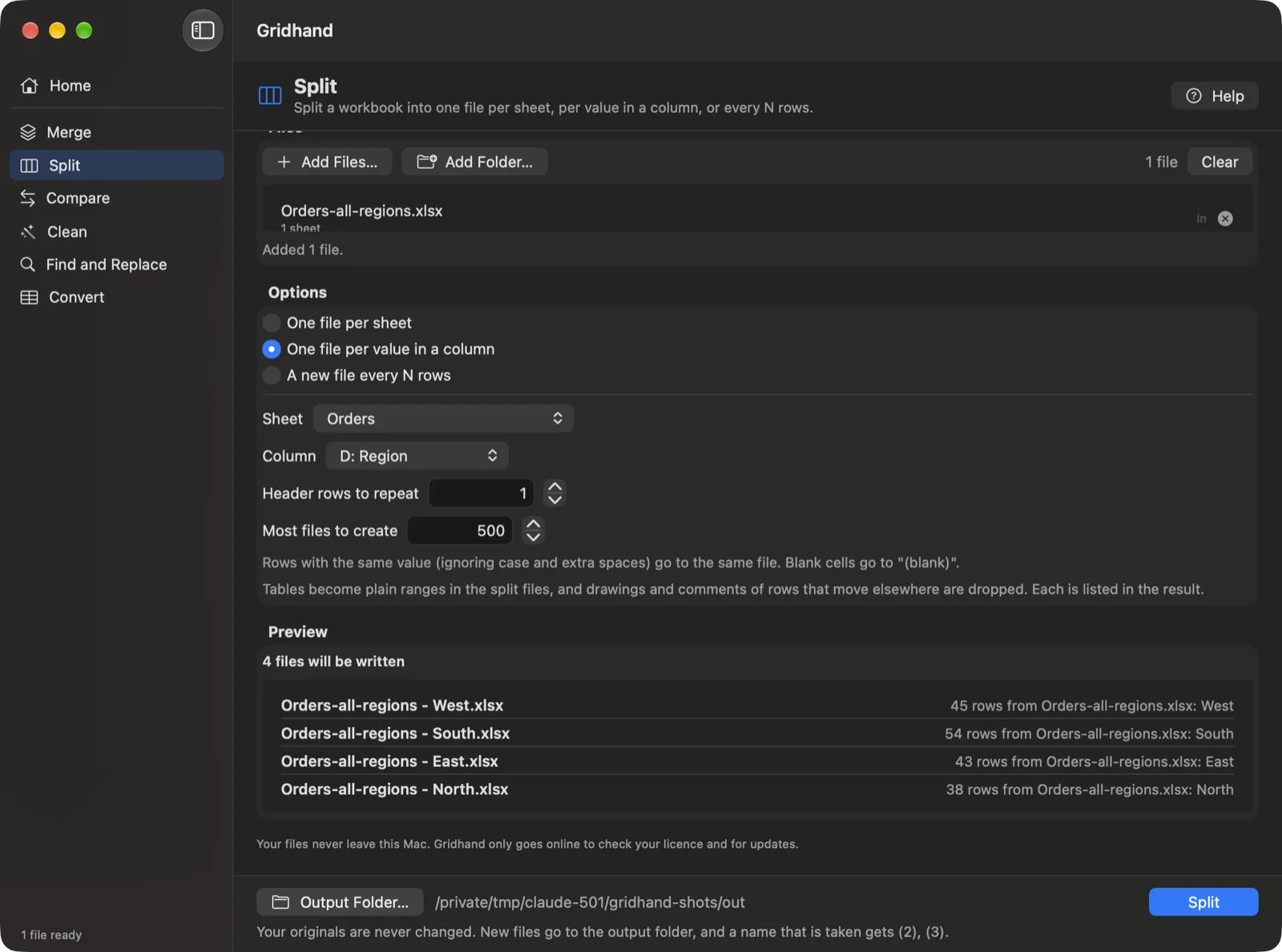
Split. Split a workbook into one file per sheet, one file per value in a column (per region, customer or month), or a new file every N rows with the header rows repeated. Guides: split a sheet into separate files, split by column value.
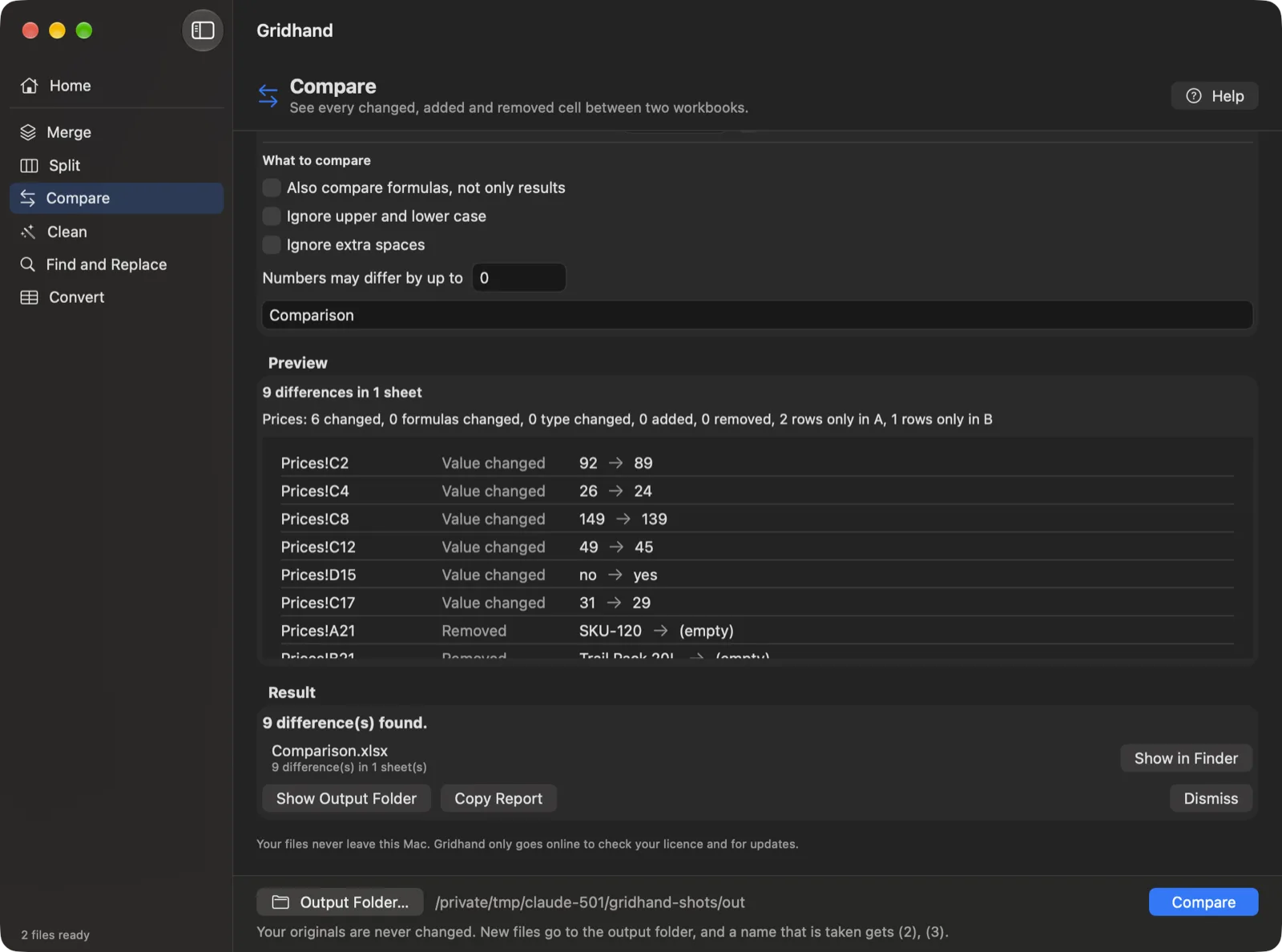
Compare. Compare two workbooks and get a new workbook with changed, added and removed cells highlighted, a Summary sheet and a Differences sheet with one line per change. Match rows by position or by key columns, ignore case and spaces, allow a small numeric tolerance. Guide: compare two Excel files on a Mac.
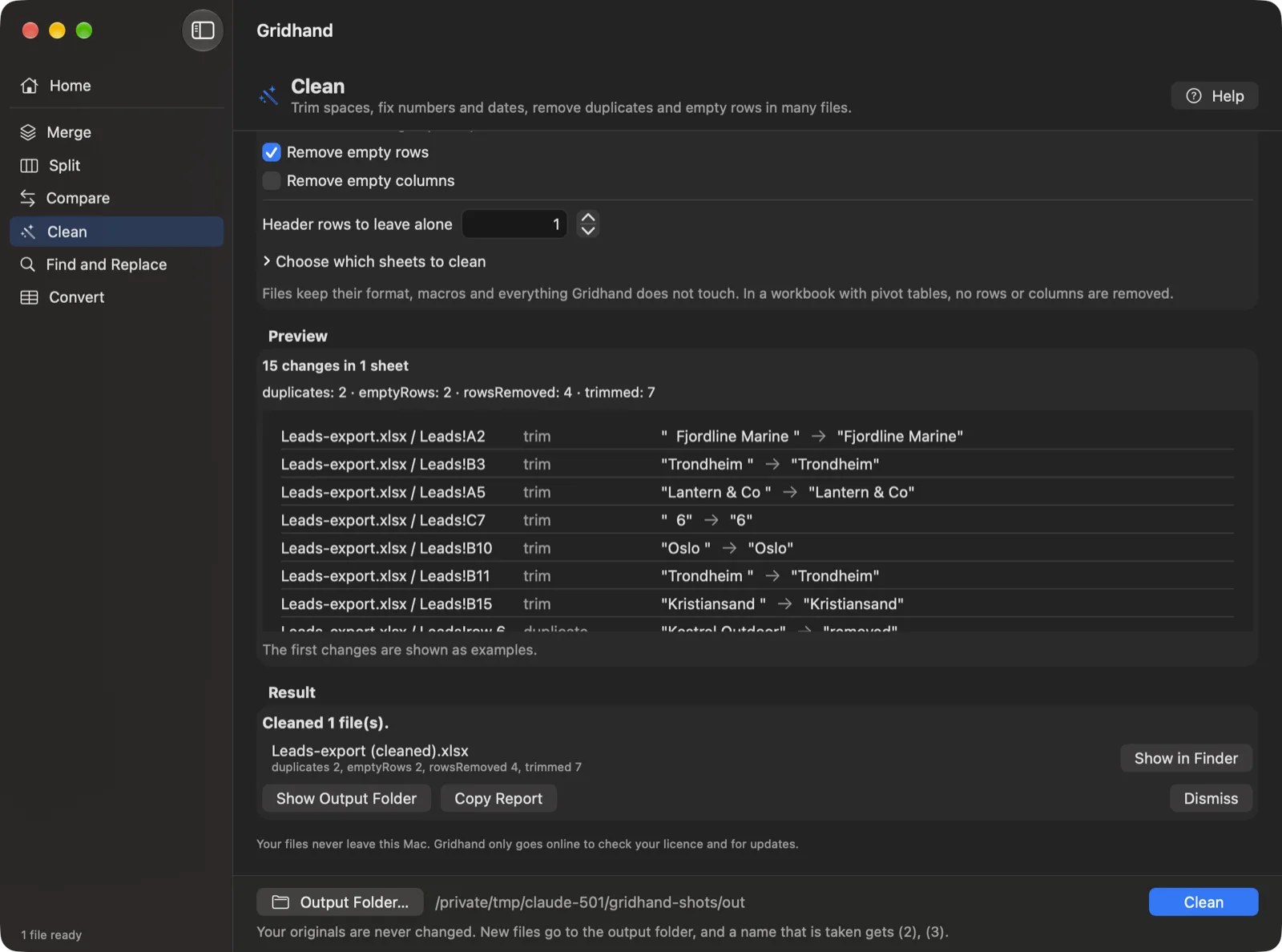
Clean. Trim spaces, turn text into numbers, standardise dates, unmerge cells and fill down, remove duplicates by the columns you choose, and remove empty rows and columns, in many files at once. Guides: clean Excel files in bulk, remove duplicates across files.
Find and Replace. Search many workbooks at once with plain text, whole-cell, case and regular-expression matching, in values, formulas or both. The preview lists every match before anything is written, and only files with matches are written. Guide: find and replace in multiple Excel files.
Convert. Turn CSV, TSV and text files into formatted .xlsx workbooks, with encoding and delimiter detection and IDs with leading zeros kept as text, or export every sheet of a workbook as CSV. Guides: batch convert CSV to XLSX, convert XLSX to CSV.
How it works
- Add files or whole folders (with or without subfolders).
- Pick a tool and its options. The preview shows what will happen, with counts and examples, and it is always free.
- Run. New files go into an output folder you choose. A name that is taken becomes “name (2).xlsx”; nothing is overwritten and your originals are never modified.
- Read the report. Anything that could not be carried over is listed in plain words, grouped by severity, and you can copy it.
See it working
The screenshots use made-up sample data, taken from Gridhand 1.0.0 on macOS.
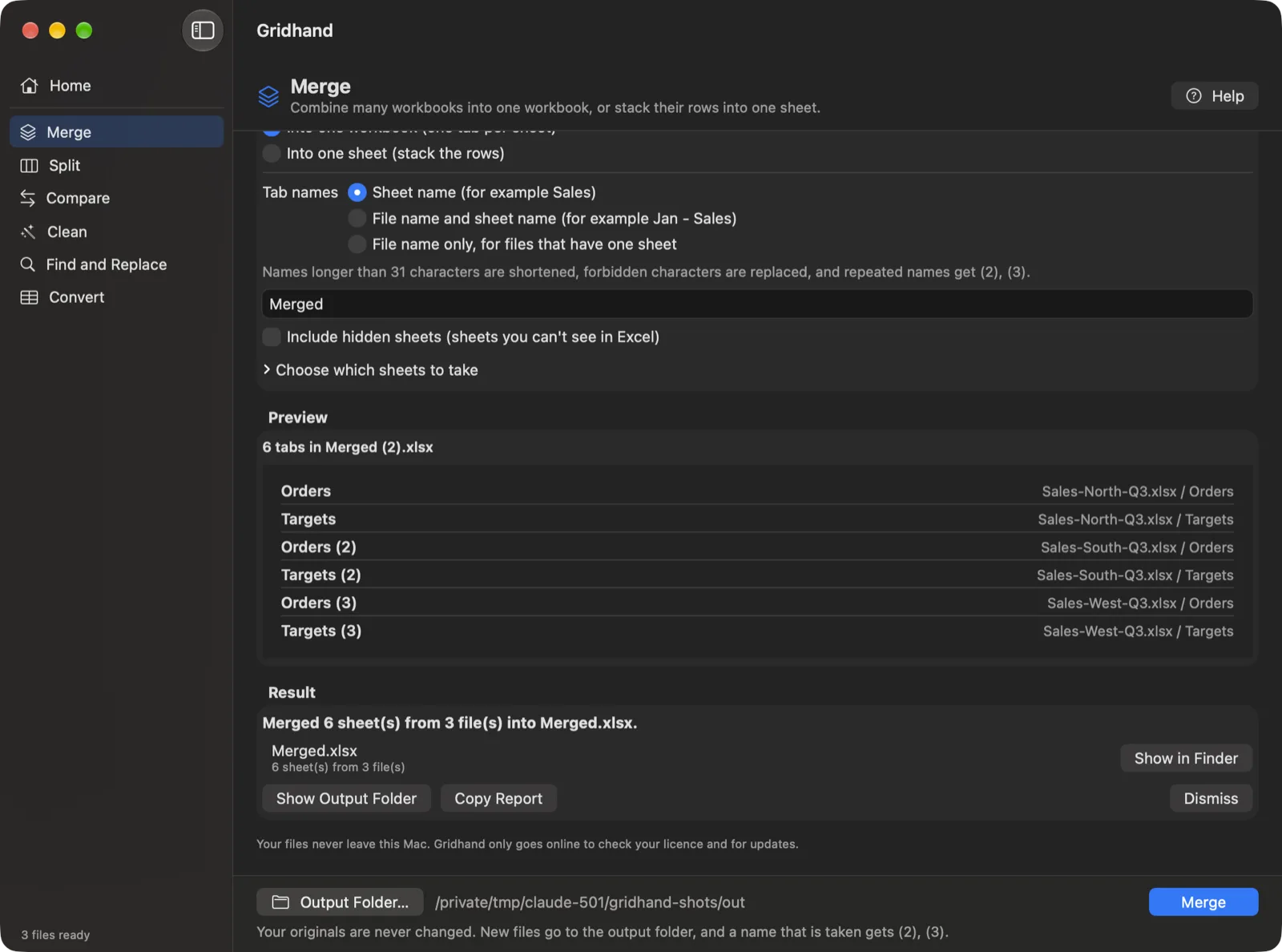
What is preserved and what is not
Gridhand works on the file itself (the .xlsx package), not through Excel, so cell formatting, formulas and most objects travel with the data instead of being re-typed. It does not need Microsoft Excel installed. The outputs are standard .xlsx files.
| Kept | Not kept (always listed in the report) | |
|---|---|---|
| Merge into one workbook | Cell formatting, number formats, column widths, merged cells, formulas (references follow renamed tabs), tables, charts, images, notes, hyperlinks, named ranges, validation, conditional formatting | Pivot tables, slicers, links to other workbooks (become their last values), threaded comments (the note text stays), form controls, macros |
| Merge into one sheet | Cell styles, formulas that can follow the new rows, merged cells inside the data, column widths of the first file | Tables, charts and images; formulas that cannot follow become values; validation and conditional formatting come from the first sheet only |
| Split | Cell formatting, widths, merged cells, filters, validation, conditional formatting; header rows repeated | Tables become plain ranges; drawings and notes of rows that moved elsewhere; formulas that point at other sheets become values; macros |
| Compare | Neither original is touched; a highlighted copy of the second workbook plus Summary and Differences sheets | Nothing is merged back into your files |
| Clean, Find and Replace | Everything else in the file, macros included (the file keeps its type) | In a workbook with pivot tables, Clean removes no rows or columns and says so; a changed formula loses its saved result and Excel recalculates on opening; table headers are never changed |
| Convert | Real numbers and dates only where a whole column agrees; leading-zero IDs stay text | Formulas are exported as saved results, merged cells as their top-left value |
Previews read at most the first 20,000 rows of a sheet and say so when a count is based on that sample; the run reads every row. Formats: .xlsx, .xlsm, .csv, .tsv and delimited .txt. Not supported: .xls (the old Excel format) and .numbers; open them in Excel or Numbers and save as .xlsx first. Password-protected workbooks are refused with a clear message.
Private
Your workbooks are read and written on your Mac. They are not uploaded, there is no account, and the app has no usage analytics. It goes online only to check your licence and to look for updates. See the privacy policy.
Pricing
- Free: every tool works on up to 3 input files per run, previews are unlimited, nothing is watermarked.
- Gridhand Pro: USD 49 one time, for 2 Macs, with one year of updates; the app keeps working after that. 30-day money-back.
Questions
Is Gridhand an Excel add-in like Kutools? No. It is a separate Mac app that reads and writes the files itself, so it needs no Microsoft Excel and nothing is installed into Excel. That is also why it works on a Mac, where add-ins built for Windows Excel generally do not run.
How do I merge Excel files on a Mac? Per Microsoft’s support pages Excel for Mac has no merge command (read 1 November 2026), so you copy sheets one by one with Move or Copy Sheet. In Gridhand you add the files or a folder, choose Merge, pick one workbook with a tab per sheet or one stacked sheet, check the preview and press Run. See the merge guide.
How do I split an Excel file into separate files on a Mac? In Gridhand choose Split and pick one file per sheet, one file per value in a column, or a new file every N rows. The preview lists the files before anything is written. See the split guide.
How do I compare two Excel files on a Mac? Microsoft’s support pages say Spreadsheet Compare is available only in Excel for Windows. In Gridhand choose Compare, add two workbooks, and it writes a copy with changed, added and removed cells highlighted plus a list of every difference. See the compare guide.
Is there a Kutools or ASAP Utilities for Mac? Not that their publishers state: Kutools’ product page names no Mac version and ASAP Utilities’ FAQ says it does not work with Mac Excel. Gridhand is a separate Mac app that does the batch file jobs, not an add-in. See Kutools for Mac alternative and ASAP Utilities for Mac alternative.
Does it change my original files? Never. Results are written as new files into a folder you choose, and an existing name gets a number instead of being overwritten.
Will my formatting survive? Cell formatting, widths, merged cells, formulas, tables, charts and images are carried over where the operation allows it. Some things cannot move into a merged or split file, such as pivot tables and macros. The table above and the run report say which.
Does it work with .xls or Numbers files? No. Gridhand reads .xlsx, .xlsm, .csv, .tsv and delimited text. Open an .xls or .numbers file in Excel or Numbers and save it as .xlsx first.
What can I do for free? Everything, on up to 3 files per run, and every preview on any number of files. Gridhand Pro removes the 3-file limit.
Why does a preview say “at least”? Previews read only the first 20,000 rows of a sheet to stay fast. When a count depends on rows beyond that, the preview says “at least” and that it is based on the first 20,000 rows. The run reads every row.
Does it use AI? No. Gridhand uses fixed rules, and nothing is sent anywhere.
Is it affiliated with Microsoft? No. Gridhand is made by Kayabyte. Excel is a trademark of Microsoft; the name is used here only to say which files the app works with.
Guides and comparisons
- All guides
- Kutools for Mac alternative
- ASAP Utilities for Mac alternative
- Gridhand vs XLclick vs XLWizard
- Power Query on a Mac: merging files and its limits
Support
Help and setup · What’s new · Email support@kayabyte.dev. Gridhand is made by Kayabyte in Oslo, Norway. See also the terms of service and refund policy.
Microsoft and Excel are trademarks of the Microsoft group of companies. Apple, Mac and macOS are trademarks of Apple Inc. Kutools, ASAP Utilities, Ablebits, XLclick and XLWizard are trademarks of their owners. Gridhand is not affiliated with, endorsed by or sponsored by any of them.