
How do you compare two Excel files on a Mac?
By Kayabyte · Last updated 1 November 2026
Excel for Mac has no Spreadsheet Compare or Inquire add-in (Microsoft’s support pages list them for Excel for Windows only), so to compare two files you build the comparison yourself: put both sheets in one workbook and subtract them with a formula or highlight differences with conditional formatting. That works for same-shaped sheets and breaks when rows move. Gridhand’s Compare tool takes two workbooks and writes a highlighted copy plus a list of every difference, matching rows by key columns if you want.
Method 1: a difference sheet
- Copy both sheets into one workbook (Control-click the tab, Move or Copy, tick Create a copy), naming them Old and New.
- Add a third sheet and in A1 enter
=IF(Old!A1=New!A1,"",Old!A1&" -> "&New!A1), then fill it right and down over the used range. - Every cell that is not empty is a difference. Use Cmd-F to search the sheet for “->” and step through.
Method 2: conditional formatting
- On the New sheet select the data range and choose Home, Conditional Formatting, New Rule, “Use a formula”.
- Enter
=A1<>Old!A1(the active cell must be the top-left cell of the selection) and choose a fill colour.
Where manual comparison breaks
- A row inserted near the top shifts everything below it, so every row looks different.
- Rows in a different order need a key: use VLOOKUP or XLOOKUP on an ID column to pull the old value next to the new one.
- Text that differs only by a trailing space, case or a number stored as text shows as a difference.
- Formulas compare by their result, not by the formula.
With Gridhand
Gridhand Compare takes exactly two workbooks and compares sheets of the same name, or one sheet you choose from each. Tick the key columns (an ID, a SKU) so moved rows still match; with none ticked, rows are compared by position. Duplicate keys are matched in order and reported. You can compare formulas as well as values, ignore case and extra spaces, and allow a small tolerance on numbers. Differences are classed as value changed, formula changed, added, removed or type changed.
The result is a new workbook: a copy of the second workbook with differing cells highlighted, a Summary sheet, and a Differences sheet with one line per difference showing the old and new value and formula. Neither original is touched. “A” is the first workbook in the list and “B” the second; Swap exchanges them.
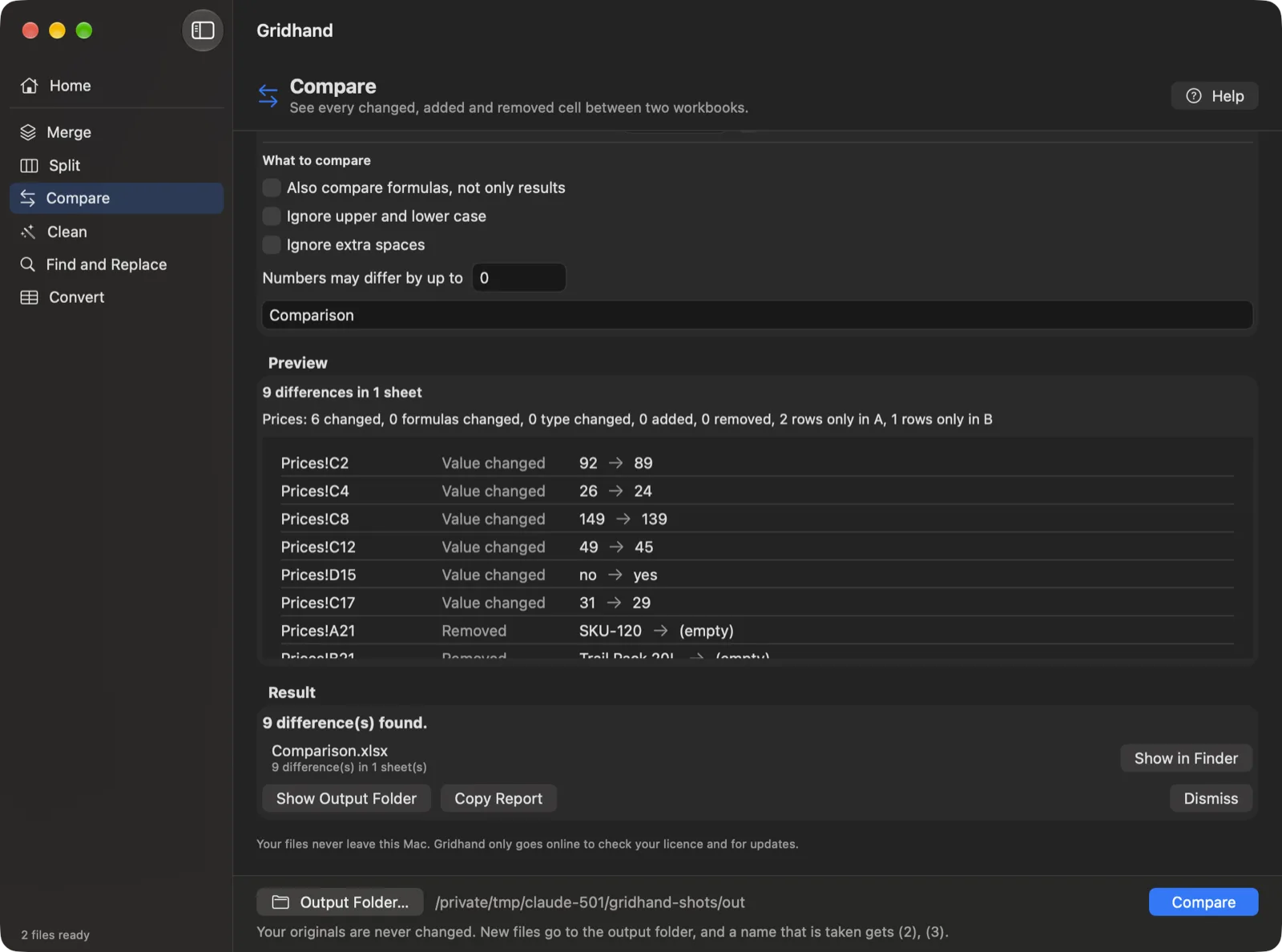
Steps with Gridhand
- Drop the two workbooks into Gridhand and choose Compare.
- Pick the sheets and tick the key columns; set the options for formulas, case, spaces and tolerance.
- Check the preview, choose an output folder and press Run.
- Open the result and read the Summary, then the Differences sheet.
Compare counts as 2 files, so it works in the free version. Download Gridhand
Questions
Is there a Spreadsheet Compare for Mac? Not from Microsoft: its support pages say Spreadsheet Compare and Inquire are available only in Excel for Windows (Microsoft 365 Apps for enterprise and equivalent editions). Third-party Mac apps, Gridhand among them, fill the gap.
Can I compare files when rows are in a different order? Yes, with key columns. Without a key, rows are compared by position.
Does it compare formulas? Optionally. You can compare values only, or formulas as well.
Will it modify my files? No. It writes a new workbook.
Related guides
Microsoft and Excel are trademarks of the Microsoft group of companies. Gridhand is made by Kayabyte and is not affiliated with or endorsed by Microsoft.
More guides
- Is there an ASAP Utilities for Mac, and what can you use instead?
- How do you batch convert CSV files to XLSX on a Mac?
- How do you clean data in many Excel files at once on a Mac?
- How do you combine multiple CSV files into one Excel workbook on a Mac?
- How do you combine multiple Excel files into one sheet on a Mac?
- How do you convert XLSX to CSV on a Mac, for every sheet and many files?
- How do you find and replace in multiple Excel files on a Mac?
- Gridhand vs XLclick vs XLWizard: which Excel tool for Mac?
- How do you merge Excel files on a Mac?
- Can you use Power Query on a Mac to merge Excel files?
- How do you split Excel data into one file per customer, region or month on a Mac?
- How do you split an Excel workbook into one file per sheet, or every N rows, on a Mac?