
Disk Drill alternative for Apple Notes: what NoteRescue does differently
By Kayabyte · Last updated 2 November 2026
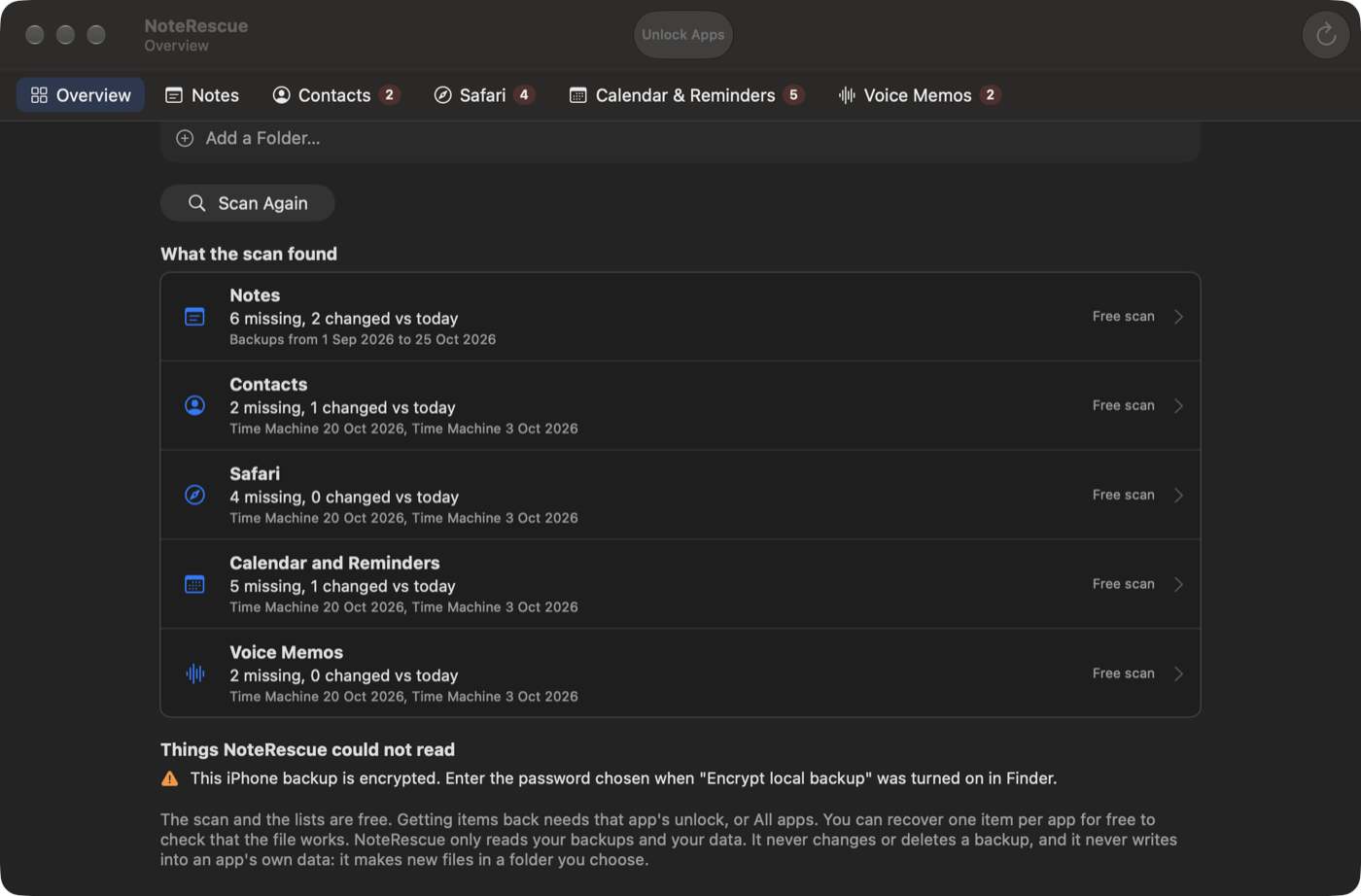
Short answer: Disk Drill scans a disk for deleted files; NoteRescue reads the Notes database inside your Time Machine and iPhone backups and lists the notes that are missing or changed. On a modern Mac a note is a record inside one database, not a file, so in our view a file-undelete scan is a poor fit for a single deleted note, while a backup from before the loss usually still holds it. Disk Drill is the better tool for lost files such as photos; NoteRescue is built for the notes. We make NoteRescue, so check Disk Drill’s own pages.
Vendor pages checked on 2 November 2026: CleverFiles’ Disk Drill pricing page and its guide to recovering deleted notes on a Mac.
What each one does
| Disk Drill | NoteRescue | |
|---|---|---|
| Built for | Recovering deleted files from a drive | Finding lost Notes, Contacts, Safari data, Calendar events, Reminders and Voice Memos in backups |
| How it finds notes | Scans the drive; CleverFiles’ own Notes guide says results depend on the drive and are not guaranteed, and the Notes data is one SQLite database | Reads the Notes database inside each Time Machine snapshot and iPhone or iPad backup, read only |
| Shows which notes are missing | Not described in its Notes guide | Yes, compared with the notes on your Mac today |
| Reads iPhone backups | Its Notes guide does not mention them | Yes, encrypted ones too with your password |
| Gets one note back without swapping your Notes data | Not guaranteed per its own guide | Yes: export, or a new “Recovered” folder in Notes |
| Free part | Free scan; recovery is paid when checked | Free scan; one free proof item per app |
| Price when checked | Lifetime licence USD 149 or one-year subscription USD 89 on its pricing page | Notes USD 24.99 once, other apps USD 14.99 to 19.99, or All apps USD 39.99; USD 15 upgrade from NoteRescue 1 |
| Platforms | See CleverFiles | Mac only, macOS 14 or later |
When Disk Drill is the better choice
- You lost photos, documents or other files from a disk, a card or a USB drive.
- You need a disk scan for something that is not in any backup.
When NoteRescue is the better choice
- You lost notes and have a Time Machine or iPhone backup from before the loss.
- You want to see which notes are missing and bring back only those.
- You also lost contacts, Safari bookmarks, calendar events, reminders or voice memos from the same backups.
Limits of NoteRescue
It needs a backup that still holds the note; locked notes are counted but never opened; iCloud-only notes that were never in a backup cannot be recovered. Reminders cannot be imported back automatically, Safari tab groups return as bookmark folders, and Contacts from a Mac snapshot come without photos. It needs Full Disk Access and works offline.
Steps with NoteRescue
- Open NoteRescue, allow Full Disk Access and press Scan. The scan is free and only reads your backups.
- Open the Notes row and filter to Missing.
- Select the notes and choose a folder.
- Export them, or recover them into Notes, where they appear in a new Recovered folder.
Download NoteRescue and scan for free · macOS 14 or later
Questions
Is NoteRescue a Disk Drill alternative for Apple Notes? For notes inside Time Machine and iPhone backups, yes. For files lost from a disk, no: that is what Disk Drill is for.
Can Disk Drill recover deleted Apple Notes? CleverFiles’ guide offers a disk scan, and says recovery is not guaranteed. A note is stored inside one database, so a scan rarely returns a single clean note.
Does NoteRescue work without a backup? No. It reads backups. If a note was never in one, nothing can recover it.
Does NoteRescue recover more than Notes? Yes, NoteRescue 2 also recovers Contacts, Safari, Calendar, Reminders and Voice Memos from the same backups.
Related guides
- NoteRescue vs Disk Drill, iMazing and Time Machine
- The best ways to recover deleted Apple Notes on a Mac
- How to recover deleted Apple Notes after 30 days
More guides
- Apple Notes disappeared: what to check first
- How to export all notes from Apple Notes on Mac (Markdown, PDF, text)
- Why does iCloud bring back deleted data after you restore it, and what can you do?
- Why is Recently Deleted empty in Apple Notes?
- How do you read an encrypted iPhone backup on a Mac without restoring the phone?
- How do you recover deleted Calendar events on a Mac?
- How do you recover deleted contacts on a Mac?
- How do you recover deleted Reminders on a Mac or iPhone?
- How do you recover deleted Safari bookmarks on a Mac, iPhone or iPad?
- How do you recover deleted Voice Memos on a Mac?
- How to get notes back from an iPhone backup on a Mac
- How to recover notes from an old Mac’s backup
- How to recover an Apple Note you edited or overwrote
- How do you get a Safari Reading List back?
- How do you recover Voice Memos from an iPhone backup on a Mac?
- How to restore a note from Time Machine
- How do you restore Calendar events from Time Machine?
- How do you restore contacts from Time Machine on a Mac?
- How do you restore only contacts from an iPhone backup on a Mac?
- How do you restore Safari bookmarks from Time Machine?
- Why did my Safari tab groups disappear, and can you get them back?
- What does Time Machine keep for Notes, Contacts, Safari, Calendar, Reminders and Voice Memos?
- Where are Apple Notes stored on a Mac?