
How do you recover deleted Safari bookmarks on a Mac, iPhone or iPad?
By Kayabyte · Last updated 2 November 2026
Short answer: with iCloud on, deleting a bookmark on one device deletes it on all of them, so start at iCloud.com: Account Settings, Data Recovery, Restore Bookmarks, and pick an archive from before the loss. If that is gone or too old, an older copy is in a Time Machine backup of your Mac or a Finder backup of your iPhone or iPad. NoteRescue reads those backups and writes the missing bookmarks to an HTML file Safari can import.
Which device did it happen on?
| Where you deleted them | Where an older copy may be |
|---|---|
| Any device with Safari in iCloud on | iCloud.com Data Recovery archives, then backups |
| A Mac | Time Machine, ~/Library/Safari/Bookmarks.plist |
| An iPhone or iPad | A backup made in Finder on a Mac; there is no Time Machine on the phone |
Method 1: iCloud.com Data Recovery (all devices)
- On iCloud.com, sign in, open Account Settings and find Data Recovery.
- Choose Restore Bookmarks and pick an archive from before the loss.
- Wait for it to finish before you change bookmarks. Apple archives your current bookmarks first, and the restore replaces the bookmarks on every device that syncs Safari with iCloud.
If you cannot reach iCloud.com, check Apple’s current help page “If you accidentally deleted your contacts, calendars or bookmarks from iCloud”, because web access settings can change what is available.
Method 2: a Time Machine backup of your Mac
- Quit Safari. In Finder choose Go, Go to Folder and open ~/Library/Safari (give Finder Full Disk Access if macOS says it is protected).
- Browse Time Machine to a date when the bookmarks existed and restore Bookmarks.plist to your Desktop, not over the live file.
- Safari cannot open a .plist, and swapping the live file lets iCloud decide which version wins, so the import route below is safer. See how to restore Safari bookmarks from Time Machine.
Method 3: a Finder backup of your iPhone or iPad
Finder keeps one backup per device and a new backup replaces the old one, so do not back the phone up again before you have checked the date of the backup you have. Restoring the whole phone from it would replace everything on the phone, so reading the bookmarks out is usually better. Safari’s History list can also help you find pages you visited, though it does not restore folders.
Steps with NoteRescue
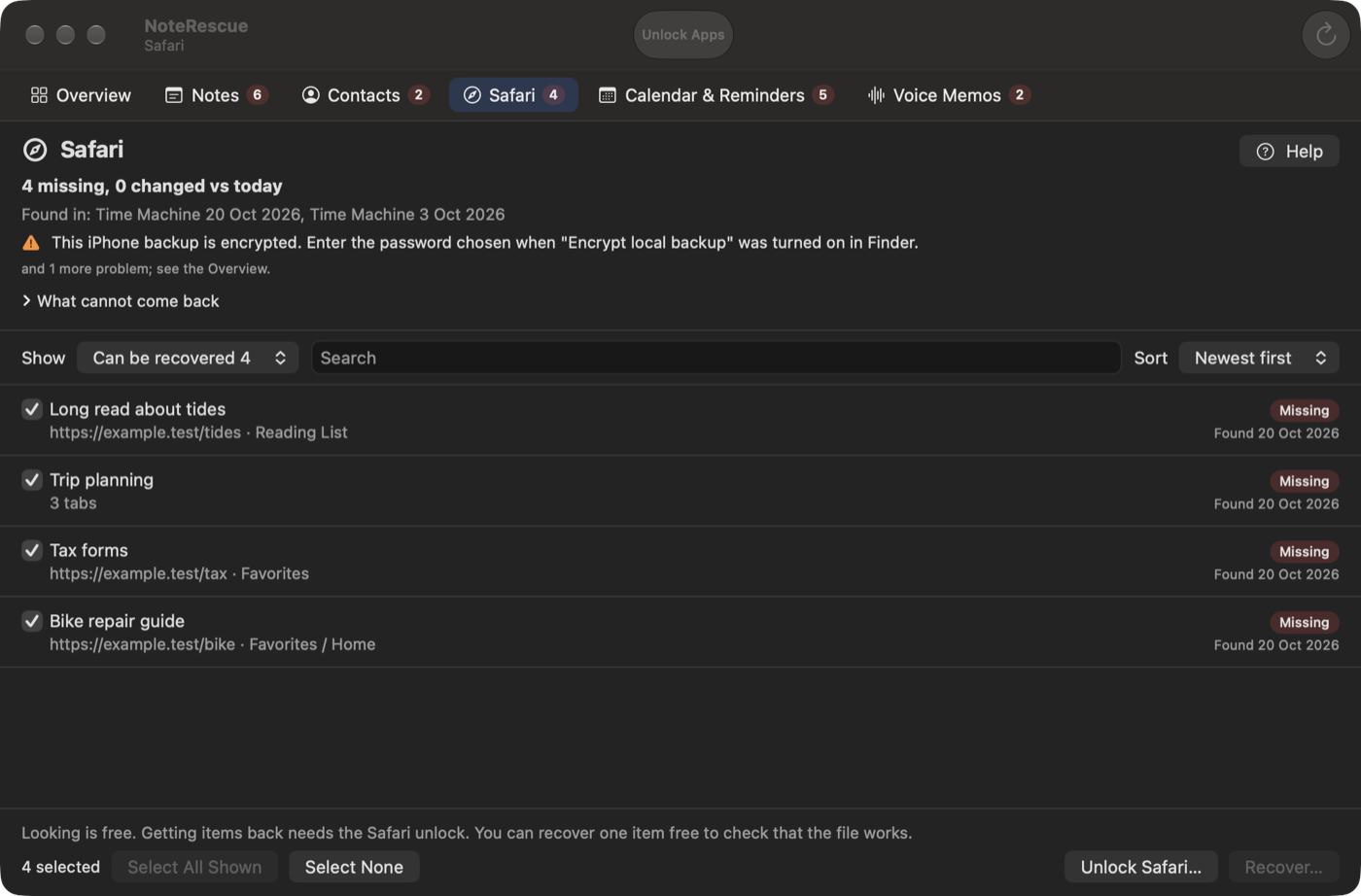
- Open NoteRescue, allow Full Disk Access and press Scan. It finds Time Machine snapshots and iPhone or iPad backups, encrypted ones with the password you chose.
- Open the Safari row, filter to Missing and select the bookmarks or folders.
- Choose a folder and recover. NoteRescue writes a bookmarks HTML file.
- In Safari choose File, Import Browsing Data from File or Folder (older macOS: File, Import From, Bookmarks HTML File), pick the file and confirm. Your existing bookmarks are not touched.
NoteRescue 2 is a suite, so the same scan also lists missing Contacts, Calendar, Reminders and Voice Memos. Safari is USD 14.99 once, or All apps USD 39.99 (USD 15 if you own NoteRescue 1); one item per app is free as a proof. Download NoteRescue and scan for free · macOS 14 or later.
What to know
- Reading List items arrive as ordinary bookmarks, and tab groups arrive as bookmark folders; see Safari tab groups disappeared.
- We tested Safari bookmarks on real encrypted iPhone backups (iOS 15.3.1 and 17.3) and a Time Machine backup on macOS 26.
- If iCloud is on, it may sync the imported bookmarks to your other devices like any new bookmarks.
- A bookmark that was created and deleted between two backups was never in one, so nothing can bring it back.
Questions
Can you recover deleted Safari bookmarks? Often yes: iCloud.com Data Recovery keeps dated archives, and older copies are in Time Machine and iPhone backups. If a bookmark was never in a backup or an archive, it cannot be recovered.
How do I recover deleted Safari bookmarks on an iPhone? Use iCloud.com Data Recovery first. Otherwise read a Finder backup of the iPhone on a Mac, for example with NoteRescue, and import the bookmarks into Safari.
Why did my Safari bookmarks disappear? Common causes are signing out of iCloud, turning Safari off in iCloud settings, or a sync conflict between devices. Check Safari in your iCloud settings on every device before you restore.
Will restoring from iCloud.com replace my current bookmarks? Apple archives your current bookmarks first, and the restore replaces the bookmarks on every device that syncs Safari with iCloud. NoteRescue’s HTML import adds bookmarks instead.
Related guides
- How to restore Safari bookmarks from Time Machine
- Safari tab groups disappeared: how to get them back
- How do you get a Safari Reading List back?
More guides
- Apple Notes disappeared: what to check first
- The best ways to recover deleted Apple Notes on a Mac
- Disk Drill alternative for Apple Notes: what NoteRescue does differently
- How to export all notes from Apple Notes on Mac (Markdown, PDF, text)
- Why does iCloud bring back deleted data after you restore it, and what can you do?
- NoteRescue vs Disk Drill, iMazing and Time Machine for recovering Apple Notes and other Mac data
- Why is Recently Deleted empty in Apple Notes?
- How do you read an encrypted iPhone backup on a Mac without restoring the phone?
- How to recover deleted Apple Notes after 30 days
- How do you recover deleted contacts on a Mac?
- How do you recover deleted Reminders on a Mac or iPhone?
- How do you recover deleted Voice Memos on a Mac?
- How to get notes back from an iPhone backup on a Mac
- How to recover notes from an old Mac’s backup
- How to recover an Apple Note you edited or overwrote
- How do you recover Voice Memos from an iPhone backup on a Mac?
- How to restore a note from Time Machine
- How do you restore Calendar events from Time Machine?
- How do you restore only contacts from an iPhone backup on a Mac?
- What does Time Machine keep for Notes, Contacts, Safari, Calendar, Reminders and Voice Memos?
- Where are Apple Notes stored on a Mac?